How to Add Souschef to the iPhone Share Sheet
Pin Souschef in iOS share options so a recipe in Safari or a social app is one tap from import. You can keep browsing until the notification arrives.

Arisa Shiraishi
Solo builder of Souschef2 min read
The fastest import is the one that never makes you leave the app you are already using. Pin Souschef to the iPhone share sheet, and a recipe in Safari, Instagram, TikTok, YouTube, Facebook, or Pinterest is one tap from your collection. 📱
When you share a recipe to Souschef, the import runs in the background. You can keep browsing, and Souschef sends a notification when the recipe is ready.
Quick answer: In Safari, tap Share, open More, tap Edit, add Souschef with +, and drag it to the top. If Souschef is missing from the list, restart your iPhone and try again.
How to add Souschef to iPhone share options
🐾 Step 1: Open Safari—or another browser—and tap Share.

🐾 Step 2: Scroll the row of app icons to the right and tap More.
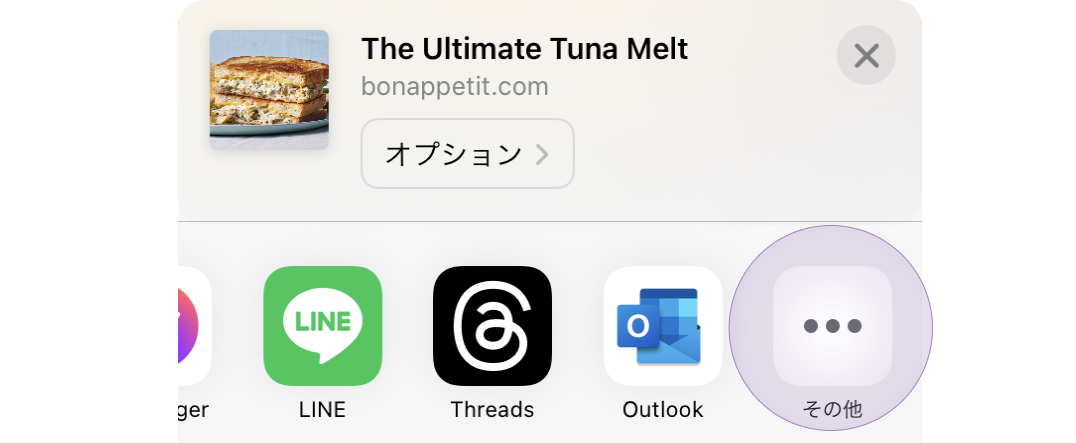
🐾 Step 3: Tap Edit in the top-right corner.

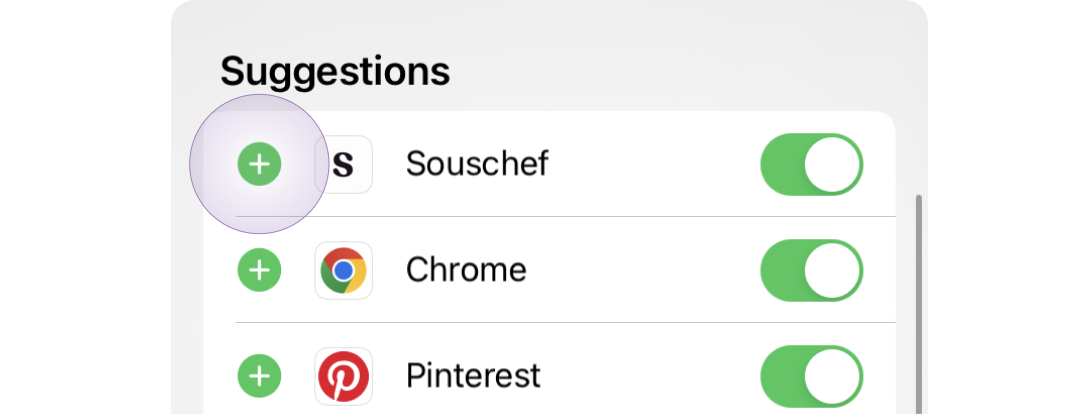
🐾 Step 4: Find Souschef and tap the + button to add it to your favorites.
🐾 Step 5: Drag Souschef toward the top of the list, then tap Done.
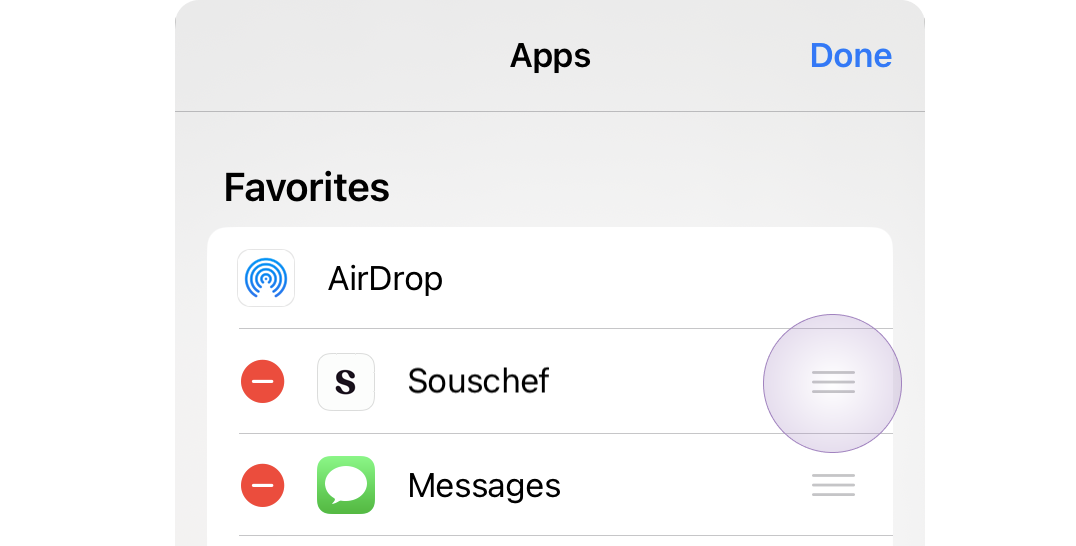
And voilà: Souschef should appear near the front of the share sheet the next time you send a recipe over.
What can you share to Souschef?
Once Souschef is pinned, use it from supported sources such as:
Souschef also supports photos and screenshots, recipes from ChatGPT or Claude, pasted text, and recipes you enter yourself. The Help Center’s supported-sources page is the source of truth for the current list.
After a shared import begins, return to the app you were using if you want. Souschef processes it in the background and sends a notification when the recipe is ready. Review the imported quantities, temperatures, timings, and steps before cooking.
If Souschef still does not appear
- Confirm that Souschef is installed and updated.
- Restart your iPhone so iOS refreshes the available share destinations.
- Repeat the More → Edit steps.
- Follow the Help Center’s missing-share-menu troubleshooting guide.
This is the iOS share sheet, not the older Shortcuts app. You do not need to build a custom shortcut for the usual recipe import.
Frequently asked questions
Is this available on Android?
Yes, but the setup is different. On Android, open the share sheet, long-press Souschef, and choose Pin Souschef. See the Android recipe keeper guide.
Do I have to wait in Souschef while a recipe imports?
No. The import continues in the background, and Souschef sends a notification when it is ready.
Why is Souschef missing from the share sheet?
iOS sometimes needs to refresh its list of share extensions. Confirm the app is installed, restart the phone, and repeat the setup steps.
Save the next recipe in one tap
Pin Souschef once, then send the next recipe over before it disappears into Saved, bookmarks, or a screenshot folder.
Once share is set up, the recipes you import still need a home. See best recipe organizer apps.