

I’m thrilled to introduce you to a feature that has been a cornerstone of the Souschef app from the very beginning
Cooking Mode 👩🏻🍳 *ੈ✩‧
Cooking Mode embodies the true spirit of Souschef: creating a seamless and intuitive cooking experience right from your phone. While many apps offer ad-free recipes, I envisioned something more. From the start, my goal was to eliminate not just distractions but also the everyday frustrations that come with cooking using a mobile device.
Solving Real Cooking Challenges
Cooking on a phone can be tricky. Here are some common issues that Cooking Mode addresses:
- Phone Sleep Mode: Phones often go to sleep while you’re cooking, causing interruptions.
- App Switching: Constantly switching between browser apps and timer apps to set timers is inefficient.
- Ingredient Measurements: Keeping track of ingredient quantities while following instructions can be cumbersome.
- Forgetting prep steps: Even if the cooking instructions say “add chopped garlic,” it is easy to forget to mince the garlic beforehand.
Cooking Mode tackles these minor yet annoying issues, significantly enhancing your cooking experience.
Use cooking mode!
✅ Prepping Step Checklist ✅
All necessary prepping steps are listed in a checklist upfront, so you can complete them first and enjoy uninterrupted cooking.
🐾 Step-by-Step Navigation 🐾
Move through your recipe one step at a time. The app guides you on what to do next, helping you stay focused and avoid missing steps.
🥬 Ingredient Adjustments 🥬
Easily adjust ingredient quantities based on the number of servings, with automatic recalculations.
📌 Ingredient Referencing 📌
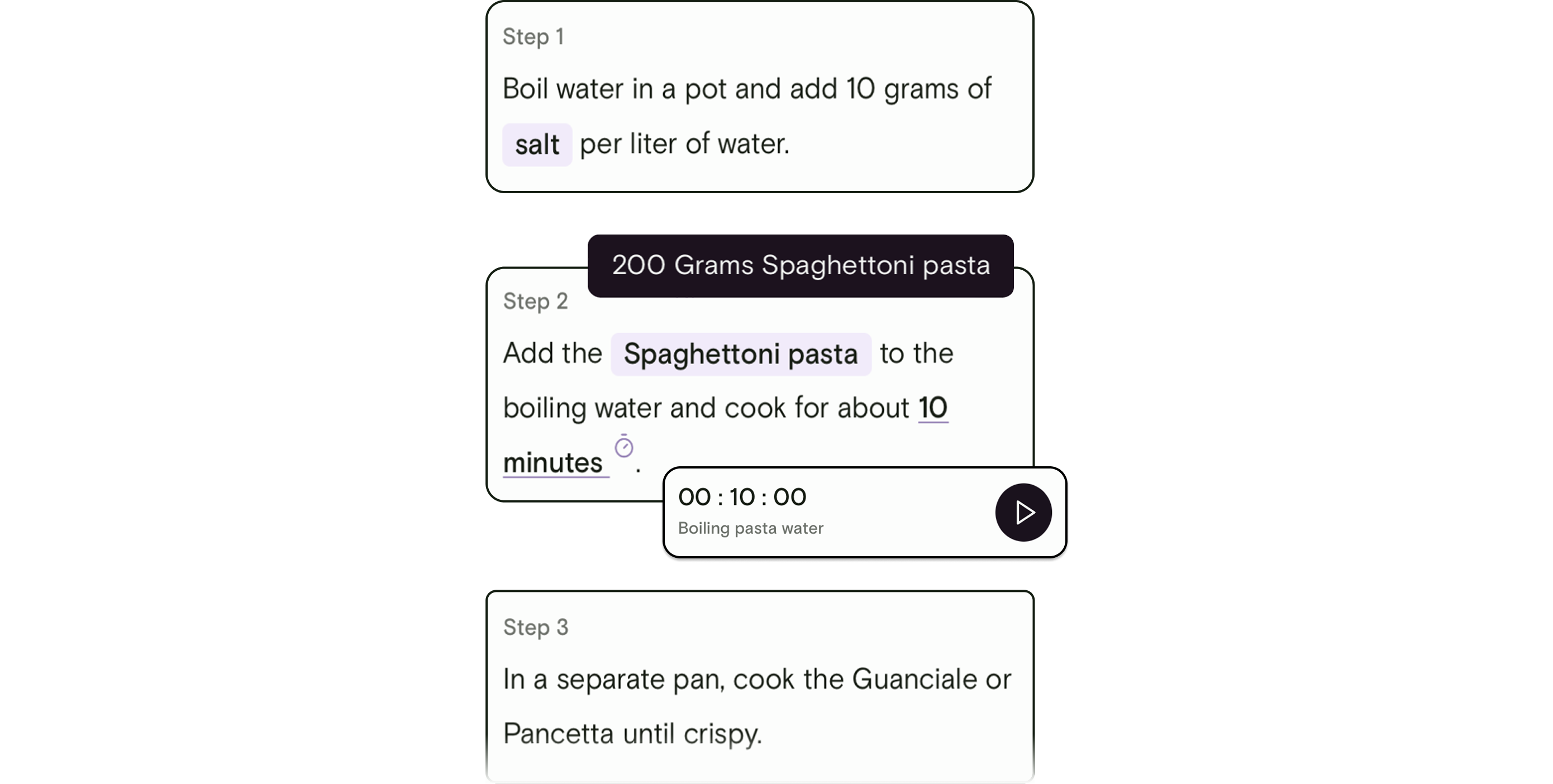
Tap on any ingredient to view its details without leaving your current step. Portions adjust according to your servings.
⏳ Smart Timers ⏳
Automatically extract timers from your recipe instructions. Start timers with a single tap and manage multiple timers within the app without ever leaving it.
😳 Keep Awake 😳
Your phone screen stays active while you’re in Cooking Mode, ensuring you never miss a step.
🎨 Multiple Recipe Window Support 🎨
Cooking multiple recipes? Open new windows within the app while keeping the state of your current recipes, including timers.
While these features might seem small individually, together they significantly improve your cooking experience. Cooking Mode is designed to be intuitive and helpful, providing you with the right information at the right time.
Try It Out!
Don’t miss out on this enhanced cooking experience. Update your Souschef app today to explore Cooking Mode. Dive into a new way of cooking and let Souschef help you create delicious dishes with ease and confidence. Happy cooking!